


Published date: August 24, 2023
Authored by: Omotayo Alimi, Senior Software Engineer
React developers always look to make their work easier and boost their output. The React world has plenty of tools, but adding Python’s flexibility creates chances for automation that go way beyond what React alone can do. Let’s check out a bunch of useful tools.
Why Use Python to Automate React Work?
Python’s strong points match up well with what React developers need for automation:
- Lots of Libraries: Python has a huge collection of libraries for tasks like working with files, making web requests, handling data, and interacting with your computer.
- Great for Scripts: Python’s simple language makes it perfect for writing scripts and automating tasks.
- Works Everywhere: Your Python automation scripts will run without issues on Windows, Mac, and Linux so your whole team can use them.
- Good with Data: If your React projects need data analysis or machine learning, Python’s skills in this area come in handy.
Key Areas for Automation
Let’s delve into specific React workflows where Python can make a significant impact:
- Code Generation:
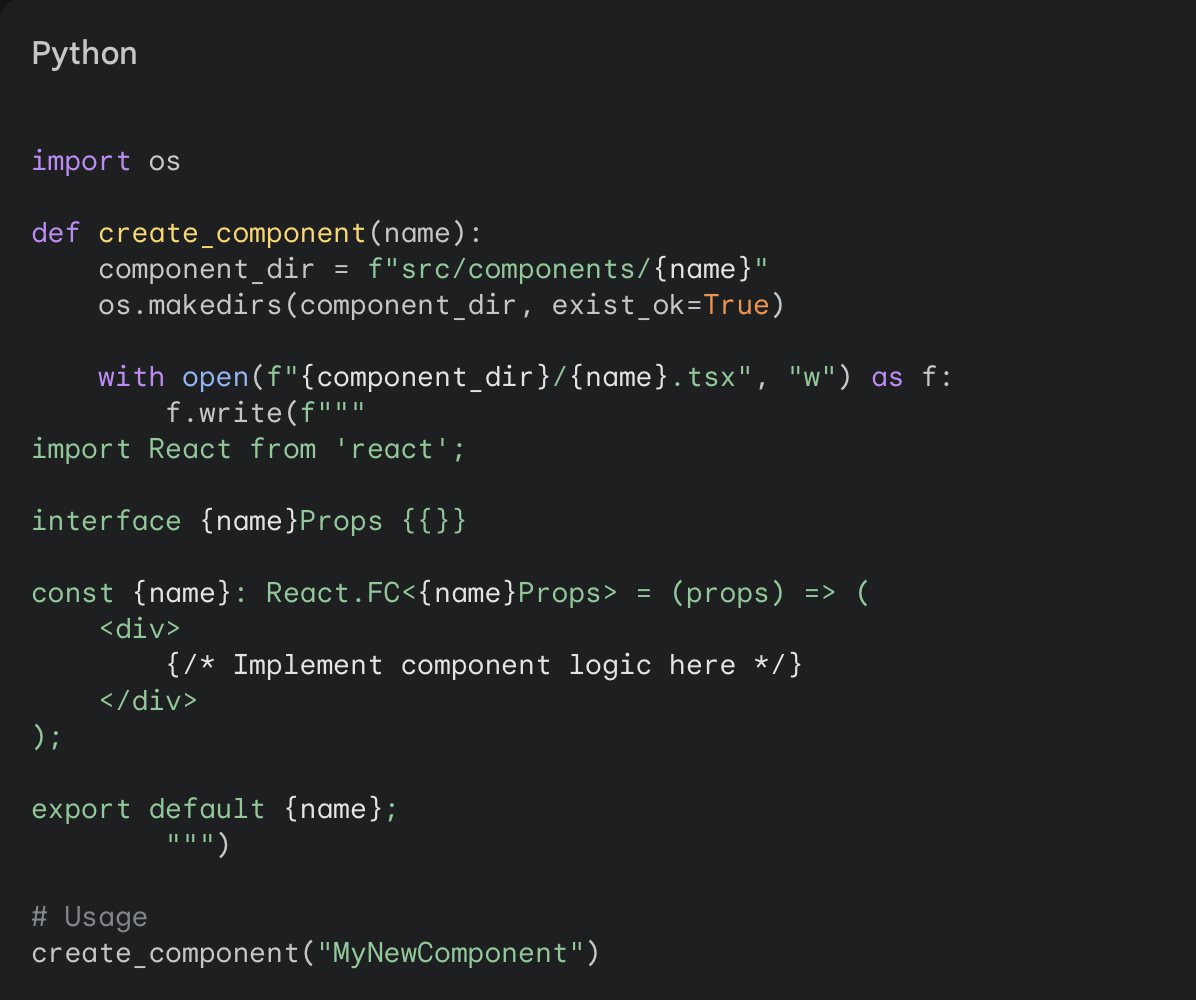
- Component Scaffolding: Create scripts to generate boilerplate code for new React components, including styling and props.
- Data Model Generation: Automatically create interfaces or type definitions based on API schemas or data structures.
- Internationalization (i18n) Setup: Streamline the process of extracting and managing translations for your React app.
- Testing and Quality Assurance:
- End-to-End (E2E) Testing: Utilize Python libraries like Selenium or Playwright to automate UI interactions and validate critical user flows.
- API Testing: Use requests or similar libraries to programmatically test your backend API endpoints for correctness and performance.
- Static Analysis: Integrate linting and code formatting tools into Python scripts to enforce consistent code quality.
- Deployment and Infrastructure:
- Continuous Integration/Continuous Deployment (CI/CD): Integrate Python scripts into your CI/CD pipelines to trigger builds, run tests, and deploy your React applications to various environments.
- Infrastructure as Code (IaC): Manage cloud infrastructure (e.g., AWS, Azure) with tools like Terraform,which has a Python API for seamless integration.
- Serverless Automation: Automate the deployment and management of your React app on serverless platforms like AWS Lambda or Azure Functions using Python scripts.
- Monitoring and Error Tracking:
- Log Analysis: Process and analyze log files to gain insights into application performance and identify potential issues.
- Error Reporting Integration: Automatically send error reports from your React app to services like Sentry using Python scripts.
- Performance Monitoring: Use Python libraries to gather metrics on page load times, API response times,and other performance indicators.
Example: Automated Component Generation

Python-Powered Automation: Best Practices
- Modularity: Split your automation jobs into Python functions or modules you can reuse.
- Version Control: Put your Python code under version control (like Git) with your React codebase.
- Documentation: Write clear notes for your automation scripts to make them easy to grasp and update.
- Error Handling: Add strong error checks to handle unexpected issues .
- Security: Be careful when working with sensitive info or login details in your Python scripts.
Wrapping Up
Adding Python to your React workflow is a smart choice. It helps you do boring tasks , write better code, and speed up your work. Python’s flexibility gives you more time to be creative and come up with new ideas. This means you can make better React apps in less time.
We’ve scratched the surface with the tips and tricks in this article. As you learn more, you’ll find tons of ways to use Python to make your work easier. This can boost how much you get done on your React projects.
Try new things, check out Python’s many tools, and tell other React developers what works for you. If we all work together, we can push the limits of what’s possible and make coding more fun and efficient.
Just remember: Automation doesn’t replace developers. It helps them focus on the most important parts of their job. With Python on your side, you’ll be ready to take on any challenge in modern React development with skill and speed.